Phone: +91-9310885321
 Email: support@learnhub4u.com

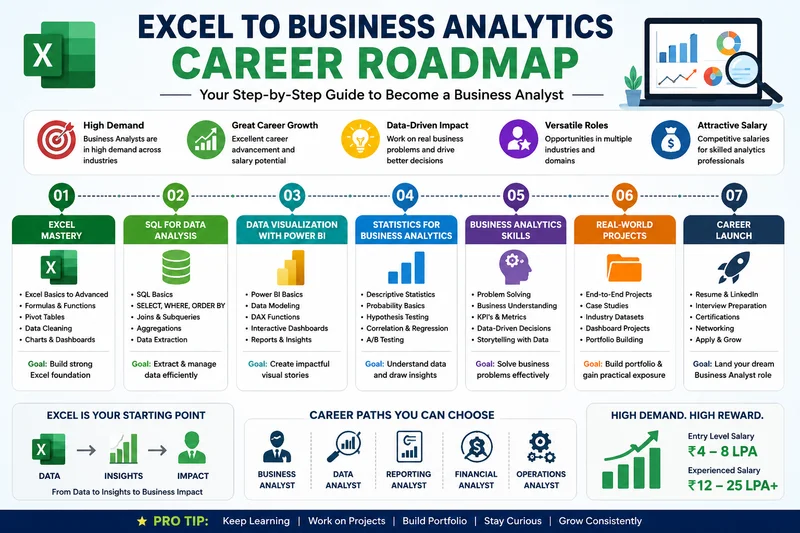
Real Talk: How to Actually Move from Excel to Business Analytics
Let’s be honest for a second. If you’re reading this, you’re probably sick of looking at endless grids, wrestling with broken formulas, or waiting for your laptop to stop freezing because your spreadsheet hit 100,000 rows.
Excel is awesome. It basically keeps the corporate world spinning. But you’ve likely realized its limits, and more importantly, you’ve realized your own goals are bigger than just data entry. You don’t want to just format tables or clean up sloppy data anymore. You want to be the person in the room who looks at the numbers and says, "Hey, our sales in the Midwest just dropped 12%, and here is exactly why and how we fix it."
That pivot—moving from just organizing data to actually telling a business what to do next—is what being a Business Analyst is all about.
At Learnhub Education, we talk to students every single day who want to make this exact jump. The biggest issue? The internet is packed with overwhelming, overly academic advice telling you that you need to master advanced calculus, learn three coding languages, and memorize 500-page books before you can even apply for a job.
Honestly? That’s nonsense. Let’s look at a realistic, step-by-step roadmap that builds on what you already know, without burning you out.
Step 1: Don't Quit Excel—Just Make It Stop Breaking
Before you run off to learn how to code, let’s squeeze everything we can out of your current skills. Companies love hiring people who are absolute wizards at Excel because it means they can actually contribute on day one.
Instead of just doing basic tables, focus on these three things:
Drop VLOOKUP entirely: Seriously, stop using it. It breaks the moment someone inserts a new column. Learn XLOOKUP or INDEX/MATCH. They are faster, smarter, and won't ruin your sheets when data shifts.
Get obsessed with Power Query: If your daily routine involves clicking the same buttons, deleting the same blank rows, and merging the same files every single morning, stop. Power Query lets you click "Record" once and automates that whole messy cleanup process with a single click.
Learn to connect tables (Data Modeling): Stop putting everything on one giant, messy tab. Learn how to link a sales table to a customer table using Excel's Power Pivot feature. If you understand how tables talk to each other, you’ve already mastered half of data analytics.
Step 2: Learn to Tell Stories (Pick Up Power BI or Tableau)
Managers and executives do not want to scroll through thousands of rows of data. They don't have the time, and frankly, they don't care about the raw numbers. They want a story they can understand in ten seconds.
That is where data visualization tools come in. Your goal here is to take those numbers and turn them into a clean, interactive dashboard.
The market is dominated by two main tools: Power BI and Tableau. At Learnhub Education, we usually tell students coming from Excel to start with Power BI. The interface feels familiar, it uses the exact same Power Query engine you just learned in Step 1, and it connects seamlessly with everything else you already use.
A quick tip from someone who reviews student work: Don't try to make your dashboards look like a futuristic spaceship with neon charts and 50 different colors. Keep it simple. A good line chart showing a trend over time is always better than a confusing, multi-colored pie chart.
Step 3: Talk to Databases Using SQL
This is the phase where things get real. In a real company, data doesn’t just sit in a neat little .xlsx file on your desktop. It lives in massive, secure databases on corporate servers or in the cloud. To get that data out so you can analyze it, you have to speak its language. That language is SQL (Structured Query Language).
Here is a quick reality check for you: If you only have enough time or brainpower to learn one technical skill outside of Excel, make it SQL. In almost every entry-level analytics interview, your technical test will be a SQL test, not a coding test in Python or R.
The good news? SQL is incredibly logical. It reads almost like broken English. You don’t need to learn how to build or manage a database server. You just need to know how to pull data out of it. Focus heavily on:
SELECT and WHERE (to pick and filter your data).
GROUP BY (to summarize things, like finding total sales per region).
JOINs (this is the big one—stitching different tables together so you can see the whole picture).
Step 4: Develop Your "So What?" Muscle
Here is a secret that most expensive bootcamps won’t tell you: you can be a genius at SQL and Excel, but if you don't understand how a business actually makes or loses money, you won't get hired.
Anyone can look up a SQL tutorial on Google. A great Business Analyst is someone who knows which questions are actually worth asking.
You need to understand basic business metrics (KPIs). If you want to work in E-commerce, you need to know what "Customer Acquisition Cost" (CAC) or "Churn Rate" means. If you want to work in Finance, you need to understand profit margins.
Every time you look at a chart, force yourself to ask: "So what?" If your dashboard shows that website traffic went up by 20% this month, ask yourself: So what? It means more people clicked. So what? Did those people actually buy anything, or did we just waste money on an ad campaign that brought in a bunch of accidental clicks? That exact mindset is what turns a data processor into a highly paid consultant.
Step 5: Build a Portfolio That Isn't Boring
Your resume can say whatever you want, but a link to a real project proves you can actually do the work.
Please, do not use the classic datasets that everyone finds on Google, like the Titanic passenger list or the Boston housing data. Recruiters have seen those a million times, and they will immediately swipe past your resume.
Find something you actually care about. It could be analyzing your own Spotify listening habits, scraping data on your favorite sports team, or pulling public data on local restaurant inspections. Create three simple projects:
The SQL Project: Take a messy, confusing dataset and write clean queries to organize it.
The Dashboard Project: Take that clean data and build a sharp, easy-to-read dashboard in Power BI or Tableau.
The Summary: Write a brief, paragraph-long note explaining what advice you would give a manager based on your chart.
A Final Note to Remember
Transitioning your career takes time, and it’s totally normal to feel frustrated when a formula breaks or a database error pops up. Don’t get stuck in "tutorial hell" where you just watch videos and collect certificates without ever building anything on your own.
Take it one piece at a time. Clean up your Excel habits, learn to pull data with SQL, put it into a nice chart, and always think about the business problem you're trying to solve.
If you keep your head down and stay curious, you’ll get there sooner than you think. You’ve got this!
FAQs:
1. I keep hearing about "Data Modeling" in Excel. What does that actually mean for a beginner?
Think of it this way: instead of cramming customer names, order details, shipping dates, and store locations into one massive, sluggish spreadsheet tab that takes five minutes to scroll through, you keep them in small, neat separate tables. Data modeling is just drawing a line between them—like telling Excel that the "Customer ID" in your sales sheet matches the "Customer ID" in your master client list. It saves your computer from crashing and makes your data run incredibly fast.
2. Can I get a Business Analyst job if I am terrible at math?
Yes, because you don't need complex calculus, linear algebra, or advanced trigonometry for 95% of these roles. Leave that to the machine learning research scientists. For business analytics, you just need basic, everyday arithmetic: percentages, averages, ratios, and simple tracking of growth or drops over time. The software does the heavy computation; your job is just understanding what the final number means for the business.
3. What is the single biggest mistake people make when learning SQL?
They try to memorize commands like they are studying for a school history exam. That is a total trap. You don't need to memorize every single complex function on day one. Beginners get overwhelmed trying to write massive, complicated queries from scratch. The real way to learn is to break it down: write a tiny query that pulls one column, make sure it works, then add a filter, make sure that works, and build it up piece by piece.
4. How many projects do I actually need in my portfolio to start applying?
Three is the sweet spot. Do not flood your portfolio with fifteen identical, tiny projects that you copied straight out of a textbook or tutorial. Pick three separate problems: one where you show you can pull data cleanly using SQL, one where you turn data into a visual dashboard, and one where you write a simple business recommendation based on what you found. Quality always wins over quantity.
5. Is SQL hard to learn for someone who has never coded before?
Not at all. People hear the word "programming" and panic, but SQL isn't like building a software app or a mobile game. There are no complex loops or interface designs to worry about. Writing a SQL query is literally just writing a very specific request in plain, slightly broken English. It feels a lot like using the filters menu on an online shopping website, just written out in text.
6. What is the difference between a KPI and a regular metric?
All KPIs are metrics, but not all metrics are KPIs. A metric is just any number you can track—like how many people visited your website today. A KPI (Key Performance Indicator) is a critical number that actually tells you if the business is succeeding or failing. If your goal is to increase profits, then your "Net Profit Margin" is a KPI. Website clicks are just a metric.
7. Can I use Mac for Business Analytics, or do I need a Windows laptop?
You can absolutely use a Mac for learning SQL and basic concepts, but there is one major catch: the desktop version of Power BI only runs natively on Windows. If you are serious about entering this field, having a Windows machine makes life a lot easier because the corporate world runs almost entirely on the Microsoft ecosystem.
8. What does a Business Analyst actually do on a typical Monday morning?
You aren't staring at advanced code all day. Usually, you start by checking your active automated dashboards to make sure no data pipelines broke over the weekend. Then, you might jump into a meeting with a marketing or sales manager who says, "Hey, our conversion rates look weird this week, can you look into it?" You spend the afternoon running queries to find out what happened and writing up a summary of your findings